
LG Gram Book (2026) Review: Is it a Worthy Investment or is the MacBook Neo the Better Choice?
If you are searching for the best laptop for office work or a practical device for students, the LG Gram Book has likely caught your attention. [Source: 3] But is it truly worth investing £461 ($620)? In this comprehensive guide, we will dive into its real-world performance and compare it against its toughest market rivals to help you make a smart, well-informed purchase decision.
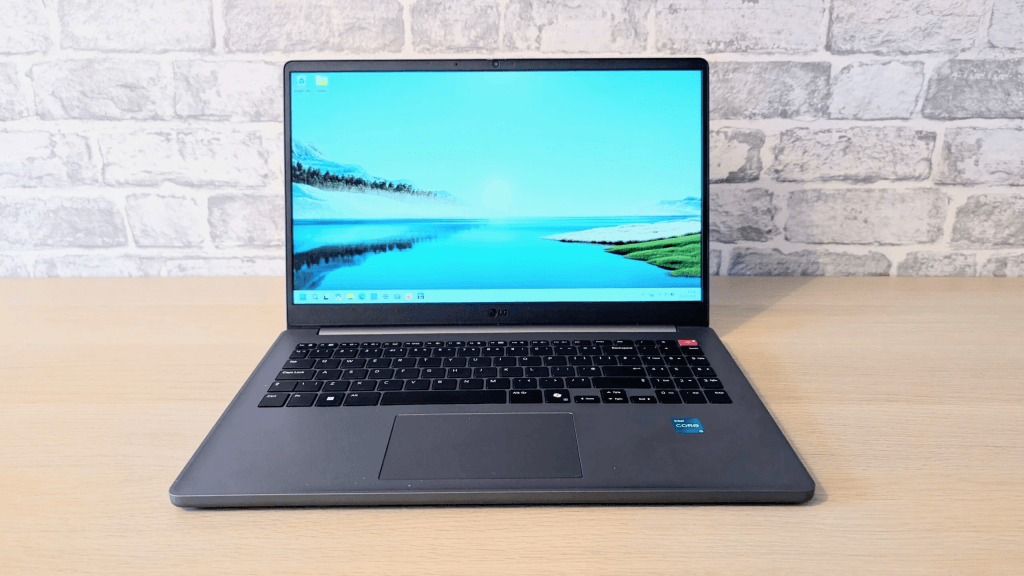
With a weight exceeding 1.5 kg, LG appears to be stretching the limits of its “Gram” brand identity—a name famous for ultra-lightweight portability. With this version, LG is attempting to offer a more affordable entry point into its premium lineup, but the overall performance positions it more as a mid-range device rather than a standout premium option in its price bracket. [Source: 5] Although it offers an acceptable user experience, its price remains uncomfortably close to higher-tier categories, while some build elements fail to reflect the quality found in competitors within the same rangege category rather than a standout premium option.
Technical Specifications Table
| Component | Detailed Specifications |
| Processor | Intel Core i5-1334U (13th Gen) |
| RAM | 16 GB DDR4 |
| Storage | 512 GB SSD |
| Display | 15.6” IPS, 1920×1080 Resolution, 60 Hz |
| Weight | 1.65 kg (Above typical series standards) |
| Ports | 2x USB-C 3.2, 1x USB-A 3.2, HDMI 2.1, 3.5mm Jack |
| Battery | 6–7 Hours (Below average) |
Pros and Cons
Positioning within the LG Gram Family:
The LG Gram Book is a new addition to the popular series, specifically designed to fill a gap in LG’s ecosystem: the mid-range category. [Source: 20] The Gram series is renowned for excellent hardware, but often at premium prices exceeding the $1,000 mark, where users pay for a luxurious build and a weight strictly maintained near 1 kg. [Source: 21] This led to the creation of this device: an attempt by LG to produce a solid mid-range computer without the strict obsession over shedding every extra pound.
Build Quality and Hardware Specifications:
Weighing 1.65 kg, this laptop’s weight might justify a different branding altogether. Instead of high-end premium components, this device targets the mid-tier market. [Source: 24] It features a 1080p display and a 13th Gen Intel Core i5 processor, accompanied by a full number pad. [Source: 25] However, the balance between price and actual performance feels somewhat uneven.
Target Audience:
- Students: For daily browsing, studying, and media consumption.
- Office Workers: Ideal for Word and Excel tasks for users who don’t rely on heavy software or frequent mobility.
While there are some nice touches, the overall impression remains that of an ordinary device in most aspects.
Pricing and Competition:
The LG Gram Book starts at $620 (£461) and is currently available in the US, UK, and Australia, At this price, it cannot truly be classified as an “economy” or budget device.
Historically, Gram series prices have been high; while this model is cheaper than its siblings, the issue is that superior options exist at the same cost.
The most prominent competitor isn’t a Windows machine, but the new MacBook Neo from Apple—the company’s first “budget” laptop.It offers a smoother user experience an all-metal chassis, a superior display, and a more competitive starting price of $599.
Comparison Table:
| Category | LG Gram Book | Apple MacBook Neo |
| Base Price | $620 / £461 | $599 / £445 |
| Processor | Intel Core (Up to Ultra 7 256V) | Apple A18 Pro (6-Core) |
| GPU | Intel Arc 140V Graphics | Integrated 5-Core GPU |
| RAM | 16 GB DDR5 | 8 GB Unified Memory |
Design and User Experience:
From an aesthetic standpoint, the device is not particularly striking at first glance It features a traditional gray chassis with a minimalist Gram logo on the lid.The only unique touch of color is the red power button, which subtly evokes the classic ThinkPad navigation nubThis “no-nonsense” design may appeal to those who want a laptop for focused work without flashy aesthetics or keyboard backlighting.

- The keyboard is decent but lacks tactile depth, and the keys feel slightly “mushy” under heavy pressure. However, the key spacing, size, and the inclusion of a number pad make for a comfortable typing experience. The touchpad is one of the device’s weakest points in terms of quality;it feels cheap and plastic, lacking the rigidity found in other devices in this class, making an external mouse almost a necessity.

- the ports: the device offers solid physical options including USB-A, USB-C (though without Thunderbolt 4 support), and HDMI.There is no SD card reader, which is understandable given the device isn’t targeted at creative professionals.


- The display is a standard IPS panel; performance is adequate in good lighting but lacks the brightness or color vividness that would set it apart from rivals.

- The webcam is 720p sufficient for basic needs but falls short for professional-grade video calls, though it does feature a physical privacy shutter.

Performance and AI Features:
The Intel Core i5-1334U processor isn’t powerful enough for high-demand tasks, it provides reliable performance for daily office work, which is its primary focus rather than gaming or creative software, Benchmarks showed modest graphics results and limited productivity gains,In tests like 3DMark and Geekbench, the device failed to reach impressive scores.
Battery and Charging:
Battery life is mediocre,It lasted only 7 hours in video playback tests and less than 6 hours in real-world usage. Charging speeds are standard, taking about two hours for a full charge, as the USB-C ports do not support advanced fast-charging protocols..
Final Verdict